
LabTracker
Member
Like most of you, I've been tracking my blood work in spreadsheets for years. Every time I got labs back I'd manually type values into Excel, try to remember what protocol I was on at the time, and squint at charts trying to figure out if that hematocrit bump was because I went from 115mg to 120mg or because I switched from enanthate to cypionate.
After doing this for a while I got frustrated enough to build something better. LabTracker is a web app that lets you upload your lab PDF and immediately see your markers charted over time, tracked against your protocol changes.

Here's what it does:
Most of us already track some of this stuff, but it's all over the place. Labs in a PDF folder, protocol history in your head or a forum post, supplements in a notes app, how you feel in... nowhere, usually. The problem isn't the individual pieces. It's that nothing connects them.
That's what I built this for. When everything lives in one place, you start seeing things you'd miss otherwise. You switch from enanthate to cypionate, did your estradiol actually change? You added NAC three months ago, what happened to your liver markers? You bumped your dose from 110 to 120 and logged feeling better two weeks later, does the blood work back that up?
That connected view across labs, protocol, supplements and symptoms is what I always wanted from a tracking tool and could never find anywhere.
Privacy, because this matters:
No account, no login, no email required. Your data stays in your browser's local storage. Nothing gets sent to a server.
The only exception is the AI analysis feature, which is off by default. If you choose to turn it on, it sends only your marker values (numbers and names) for analysis, not your name, DOB, lab info, or anything identifying. You get a consent prompt every time before anything leaves your device.
No ads, no affiliate links. I built this because I needed it myself.
Screenshots:


Try it out:
You can play with the demo data here to get a feel for it: www.labtracker.app
When you're ready to use your own labs, click "Start fresh" and upload a PDF.
The more lab formats I can test against, the better the parser gets for everyone.
There are two ways you can help:
1. Upload and report. Just try uploading your PDF. If it works, great. If it doesn't parse correctly (wrong values, missing markers, broken date), hit the "Report a parsing issue" button in Settings. That sends me a description of what went wrong without the PDF itself.
2. Send me your actual PDF. This is honestly the most valuable thing anyone can do to help improve the tool. The parser is built and tested against real PDFs, and the more variety I have, the fewer edge cases slip through. If you're willing, you can email a PDF to [email protected]. Feel free to redact your name, DOB, SSN, whatever you want. I only need the marker table and layout.
I want to be upfront about what happens with PDFs you send me. I use them exclusively to test and improve the local parser, which is the code that runs in your browser. They don't get uploaded to any AI service, they don't get shared with anyone, and they don't leave my development machine. Once the parser handles your format correctly, the PDF has done its job. If you want me to delete it after, just say so and I will.
I realize that's a trust-based ask and you don't know me. So I'd say: start by trying the app with the demo data, look at the source code if you want (it's open source: [GitHub link]), and decide from there whether you're comfortable.
Other feedback I'd love to hear:
Everything is free during the beta. I'm planning to keep the core features (upload, charts, protocols, exports) free permanently and eventually add a paid tier for AI analysis and some advanced features. But right now it's all open. Use it, break it, tell me what needs fixing.
After doing this for a while I got frustrated enough to build something better. LabTracker is a web app that lets you upload your lab PDF and immediately see your markers charted over time, tracked against your protocol changes.
Here's what it does:
- Upload your lab PDF instead of typing everything by hand. It reads LabCorp, Quest, and most other standard lab formats. Scanned PDFs work too (it runs OCR in your browser).
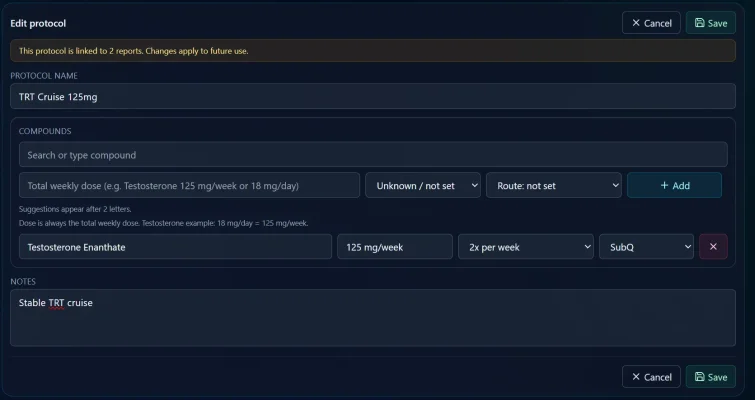
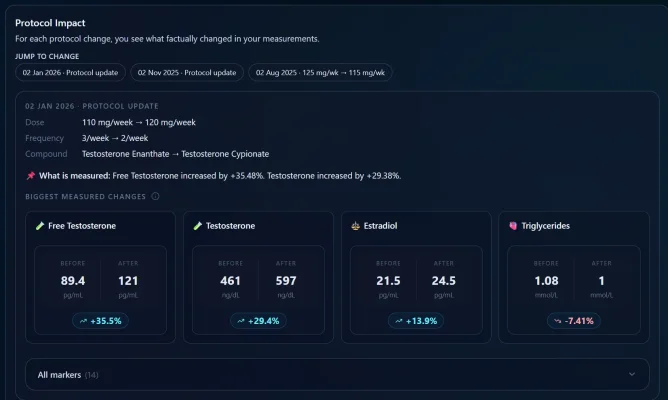
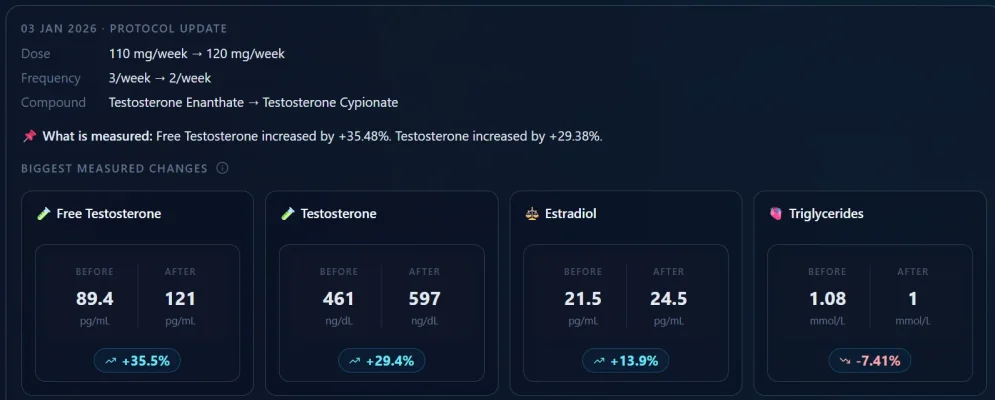
- Track protocols alongside markers. Log your compound, dose, and frequency. When you change protocol, the app shows what actually changed in your blood work. Before vs. after with percentage deltas for every marker.
- Trend charts with clinical context. Reference ranges, TRT target zones, and trend direction for every marker. Supports both US and European units.
- Alerts that flag when markers cross thresholds (hematocrit > 52%, PSA trending up, etc.) and project future trends based on your history.
- Supplement timeline. Track your supplement stack separately from your protocol, with auto-matching to blood tests.
- Wellbeing check-ins. Log energy, mood, sleep, libido, motivation on a simple scale. Builds a timeline you can compare against your labs.
Most of us already track some of this stuff, but it's all over the place. Labs in a PDF folder, protocol history in your head or a forum post, supplements in a notes app, how you feel in... nowhere, usually. The problem isn't the individual pieces. It's that nothing connects them.
That's what I built this for. When everything lives in one place, you start seeing things you'd miss otherwise. You switch from enanthate to cypionate, did your estradiol actually change? You added NAC three months ago, what happened to your liver markers? You bumped your dose from 110 to 120 and logged feeling better two weeks later, does the blood work back that up?
That connected view across labs, protocol, supplements and symptoms is what I always wanted from a tracking tool and could never find anywhere.
Privacy, because this matters:
No account, no login, no email required. Your data stays in your browser's local storage. Nothing gets sent to a server.
The only exception is the AI analysis feature, which is off by default. If you choose to turn it on, it sends only your marker values (numbers and names) for analysis, not your name, DOB, lab info, or anything identifying. You get a consent prompt every time before anything leaves your device.
No ads, no affiliate links. I built this because I needed it myself.
Screenshots:
Try it out:
You can play with the demo data here to get a feel for it: www.labtracker.app
When you're ready to use your own labs, click "Start fresh" and upload a PDF.
Where I really need your help
The hardest part of this entire project isn't the charts or the protocol tracking. It's the PDF parsing. Every lab uses a different format, different layouts, different ways of writing reference ranges. I've tested against LabCorp, Quest, and a handful of European formats, but I know there are dozens more out there. Private labs, hospital systems, international formats, scanned copies from your doctor's office.The more lab formats I can test against, the better the parser gets for everyone.
There are two ways you can help:
1. Upload and report. Just try uploading your PDF. If it works, great. If it doesn't parse correctly (wrong values, missing markers, broken date), hit the "Report a parsing issue" button in Settings. That sends me a description of what went wrong without the PDF itself.
2. Send me your actual PDF. This is honestly the most valuable thing anyone can do to help improve the tool. The parser is built and tested against real PDFs, and the more variety I have, the fewer edge cases slip through. If you're willing, you can email a PDF to [email protected]. Feel free to redact your name, DOB, SSN, whatever you want. I only need the marker table and layout.
I want to be upfront about what happens with PDFs you send me. I use them exclusively to test and improve the local parser, which is the code that runs in your browser. They don't get uploaded to any AI service, they don't get shared with anyone, and they don't leave my development machine. Once the parser handles your format correctly, the PDF has done its job. If you want me to delete it after, just say so and I will.
I realize that's a trust-based ask and you don't know me. So I'd say: start by trying the app with the demo data, look at the source code if you want (it's open source: [GitHub link]), and decide from there whether you're comfortable.
Other feedback I'd love to hear:
- Does the protocol impact view match your real-world experience?
- Are there markers or features you'd find useful that aren't there yet?
- How does it handle your specific lab format?
- Any general bugs, things that look broken or behave weird (this is a beta, still in development)
- Anything that seems off in the calculations or logic. If a percentage change doesn't add up, or a trend direction doesn't match what you're seeing in your own numbers, I want to know about it
Everything is free during the beta. I'm planning to keep the core features (upload, charts, protocols, exports) free permanently and eventually add a paid tier for AI analysis and some advanced features. But right now it's all open. Use it, break it, tell me what needs fixing.